
Audit Trail Reporting: 5 Steps to Audit Ready Evidence for Compliance

Short answer
Define the question, source systems, events and time range for the report. Reconcile the export to retained source records and document attribution, coverage and integrity limits. A formatted report alone does not prove who acted, completeness or conformity with an assurance framework.
Define the question, source systems, events and time range for the report. Reconcile the export to retained source records and document attribution, coverage and integrity limits. A formatted report alone does not prove who acted, completeness or conformity with an assurance framework.
TL;DR:
- Define the reporting question, relevant actions and time window. Record exclusions and check the export against that scope; filtering does not establish completeness or compliance.
- Select access-method, IP and authentication fields where relevant, and interpret them with corroborating records rather than as proof of an actor or incident.
- Keep export hashes, query details and custody records. Have the responsible reviewer confirm retention and access requirements; an export hash does not prove the source log was complete or accurate.
- For recurring reports, test scheduled queries and permissioned dashboards against the reporting scope, and check failed runs and omitted events.
- Map the workflow and likely evidence questions before selecting fields. Test whether the resulting report answers those questions and document any gaps.
Table of Contents
- What audit trail reporting covers: definition, scope and use cases
- Key fields and components every audit trail report must capture
- How to generate and scope an audit trail report in practice
- How to interpret audit trail reports: from columns to decisions
- Automating audit log analysis and building an analysis pipeline
- Retention, integrity and chain-of-custody for audit trail reporting
- Common pitfalls, noise handling and troubleshooting audit reports
- Pattrn Data perspective: mapping workflows before tools
- How Pattrn Data can help with audit-ready workflows
- Sources
- FAQ
What audit trail reporting covers: definition, scope and use cases
An audit trail report selects and presents system events for a defined review. Check which events and fields the source records and which integrity controls protect it. The linked Forensic Notes guide discusses essential fields including date/time, actor, object type, action, and access method; assess which fields are available and relevant when tracking a ledger entry, permissions change or API call.
The scope varies by context. In finance, an audit trail might show a journal entry moving from draft to posted, with the user ID and timestamp attached at each stage. In security operations, it might show a failed login followed by a successful one from a different IP address. In software delivery, it might show a configuration change to a production environment.
Different roles depend on this data for different reasons:
- Finance and controllership teams need it to evidence segregation of duties and reconcile entries.
- Compliance reviewers can compare reported activity with the control design, accounting for missing events and other evidence needed.
- Security teams need it to reconstruct incidents and identify lateral movement.
- Internal and external auditors can assess its relevance and reliability alongside other fieldwork evidence.
Key fields and components every audit trail report must capture
Select fields against the review question. Start with timestamp, actor identifier, affected object and action; assess whether access method and other context are needed. Document unavailable fields and their effect on interpretation.
Pro Tip: Access-method data can help distinguish browser, API and script activity. Treat it as context to investigate with other records, not as a standalone incident classification or a universal first priority.
Beyond the core fields, stronger reports include:
- Correlation or request IDs, so related events across systems can be joined into one timeline
- Before-and-after values (a diff), particularly for financial or configuration changes
- IP address and userAgent as investigation context, not proof that a person or script performed the action
- Document or ticket references, linking the system event back to an approval or change request
- MFA authentication status, interpreted against the provider's field definition and the authentication requirement for that action
Field selection should follow your purpose. A financial audit trail leans on document numbers, debit and credit amounts, and reversal links, the kind of detail Microsoft’s Business Central Audit Trail report provides at the G/L entry level. A security investigation leans harder on IP, userAgent, and authentication status. Collect only the additional fields needed for the review, subject to data-minimisation, access and retention decisions. Confirm the current Business Central report fields before relying on that example.
How to generate and scope an audit trail report in practice
Define the scope before exporting. Query behaviour, source coverage, permissions and time settings still need checking after the scope is agreed.
- Define the object and time window first. Decide whether you’re reporting on a single account, a business unit, or a whole system, and choose a window that covers the review question and any relevant preceding or subsequent events. A quarter is an example, not a required limit.
- Select the action types that matter. Creates, updates, deletes, and access events each answer different questions. Don’t default to pulling everything.
- Apply filters for user, IP, event type, and correlation ID. This is what turns a data dump into a readable narrative rather than a spreadsheet nobody will open.
- Choose your export format deliberately. CSV suits further analysis, JSON suits API-to-API transfer, PDF may suit a readable review pack; retain the source export and transformation details separately. A PDF format does not establish sign-off or evidence integrity.
- Set up scheduled exports for recurring needs. If the same report is needed periodically, consider a tested saved query or scheduled export. Record the query version, run result and checks for failed or partial runs.
Pro Tip: Avoid the temptation to export “everything, just in case.” Oversized exports slow down review, bury the signal an auditor actually needs, and increase the risk of exposing data that should have stayed out of the evidence pack.
How to interpret audit trail reports: from columns to decisions
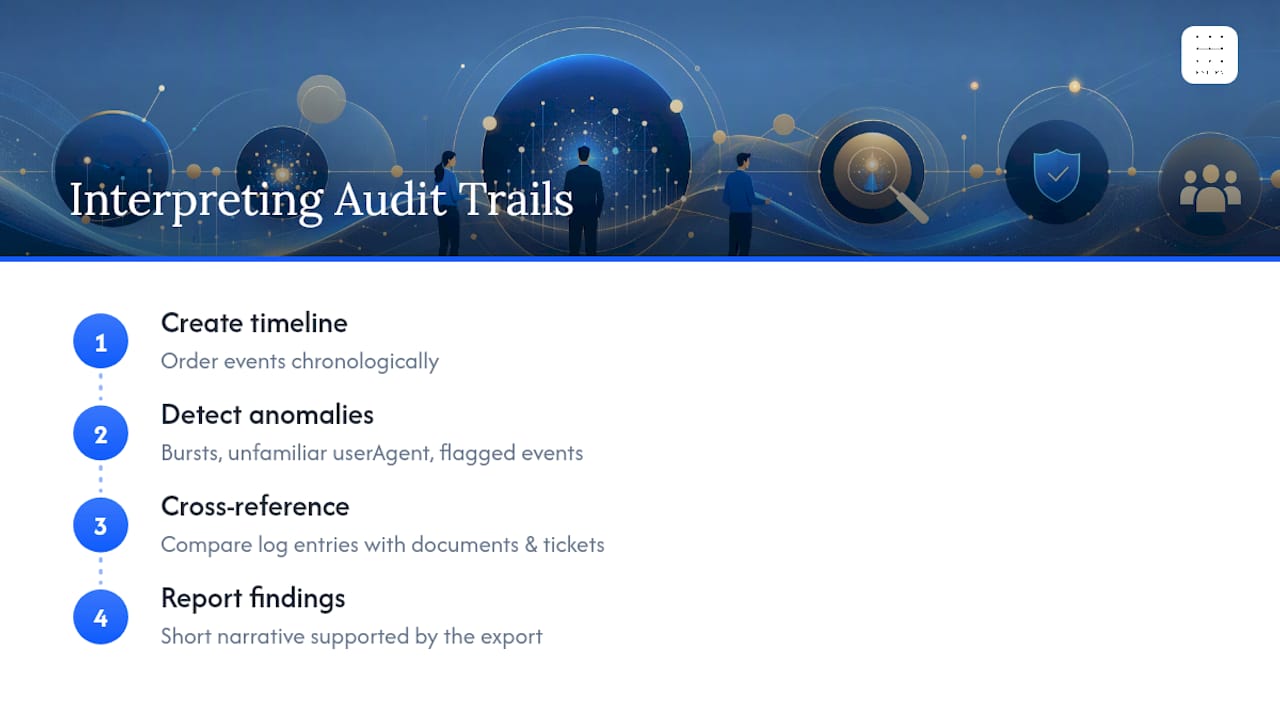
Build a timeline from the events, retaining timestamp precision, time-zone information and known clock differences. Order events chronologically and look for what breaks the normal pattern: a burst of activity outside business hours, an unfamiliar userAgent string, or an event flagged with mfaAuthenticated: false where verified access should have been mandatory.
For platform-specific investigation methods, consult Google Cloud's guidance on baseline queries and statistical thresholds to flag unusual behaviour; check query coverage and tune thresholds for the system being reviewed. AWS's linked incident-response guide discusses fields like userAgent, session names, and timing patterns often reveal staged or automated attacks. Correlate these with authentication and activity records rather than treating them as proof of an attack or a particular actor.
Cross-reference the log entries against source documents and ticketing systems wherever possible, using security tooling and best practice to help identify anomalies and verify user activity. Compare approvals with execution events, allowing for service accounts, delegated actions and differences between approval and execution times. Investigate discrepancies before classifying them as control findings.
Assess source coverage, actor attribution, integrity and the handling of reversals or corrections against the review purpose. State known gaps and attribution limits. Present a short narrative with the underlying export, query and custody details; the report alone does not establish non-repudiation.
Automating audit log analysis and building an analysis pipeline
If volume or repetition makes manual reporting impractical, assess a pipeline against a saved-query or batch-export approach. Include operating cost, failed-run handling and access review in the decision.
Classify events by the review purpose before choosing active or archived storage. Logins, permission changes and financial postings may need rapid retrieval; health checks, heartbeats and polling may still show outages or missing coverage. Assess the architecture described in Confluent’s guidance on real-time compliance logging against your retrieval, retention and cost requirements; no performance or cost result is established here.
Assess whether the chosen BigQuery or Google Log Analytics configuration supports the required query, schedule and permissions. Test a baseline and thresholds on permitted records, including false positives and missing events. Restrict dashboard drill-down to the data each reviewer is authorised to see.
| Pipeline stage | Typical approach | Main trade-off |
|---|---|---|
| Ingestion and routing | Split high-fidelity events from noise at source | Requires upfront classification effort |
| Storage | Active index for recent/critical data, cold storage for the rest | Cost savings versus slower retrieval on old data |
| Analysis | Scheduled SQL queries, statistical baselining | Detection quality depends on tuned thresholds |
| Presentation | Permissioned dashboards over static exports | Better self-service, more access control to manage |
Retention, integrity and chain-of-custody for audit trail reporting
Document how the export relates to its source and state what cannot be verified. Retention policy is the starting point: map how long you keep logs to what your regulator or contract actually requires, not to whatever your storage vendor defaults to.
Integrity controls matter just as much as retention length. Record a cryptographic hash when an export is captured and protect the reference hash and custody record. A later matching hash supports byte integrity relative to that reference; it does not prove the export matched the source, that the source was accurate or complete, or that earlier changes did not occur. Preserve the query, source identifiers, run details and reconciliation checks separately.
Pro Tip: Capture the reference hash promptly and record when, how and by whom it was obtained. If the first reference was captured later, disclose that gap; it cannot establish integrity for the preceding period.
Before sharing an evidence pack, confirm:
- Retention period has been assessed against applicable duties, contractual terms and data-minimisation requirements
- Export hash, capture time and custody records are retained with access and alteration controls
- Access to the export required approval, not just any team member’s login
- Segregation of duties held: the person who made the change isn’t the one certifying the evidence
Common pitfalls, noise handling and troubleshooting audit reports
Investigate coverage, field definitions, timestamps and query limits as well as event volume. Reducing noise does not resolve all reporting or security issues.
- Assess whether heartbeat and health-check events are relevant to coverage or incident reconstruction before changing their routing. Record retrieval and retention consequences.
- Watch for inconsistent timestamps across systems (time zone mismatches are a common, boring cause of “missing” events).
- For large volumes, consider bounded batches with documented ranges, ordering and reconciliation checks. If sampling is appropriate to the review question, record the method and limits; a sample is not a complete export.
- Validate row counts and date ranges against the request before sending anything to an auditor, and document any difference. Matching counts and ranges do not by themselves establish that every relevant event was recorded.
Pattrn Data perspective: mapping workflows before tools
Map the workflow, review question and required evidence before selecting logging fields. Compare a test export with those requirements and record technical and process gaps. This is a proposed working method, not a verified finding about most audit failures or the scope of a Pattrn service.
The smallest useful pilot is narrow: pick one workflow, produce one evidence pack, and confirm a human still signs off before anything leaves the building. Use the pilot to record gaps and decide whether the method needs revision before expanding its scope. Our guidance on creating audit trails for AI-assisted workflows walks through this at pilot scale.
Rohit
How Pattrn Data can help with audit-ready workflows
If considering external help with hashing, routing, retention or reporting, agree the workflow, deliverables, source access and review responsibilities before booking. Confirm the current service scope and terms; this article does not establish an evidence-grade Pattrn deliverable or the firm's available engineering capacity.

Compare an internal build and supplier support against the required approvals, evidence access, operating capacity and accountable owner. Test those controls in the proposed configuration; private-workspace or operating-system labels do not establish that they work.
Start with our guide on creating audit trails for AI-assisted workflows without spreadsheets to see what a controlled pilot looks like before you commit to a bigger build.
Sources
Recommended
Frequently asked questions
What is an audit trail report?
It selects and presents recorded events for a defined review, often using time, actor identifier, object and action fields. Assess source coverage and attribution limits; a recorded identifier does not itself prove who acted.
What is an example of an audit trail?
A finance review might trace a journal entry from draft to posting and any reversal. For the linked Business Central report, confirm current fields, filters and permissions against the version in use before relying on it.
How do I report audit trail findings in an audit report?
Present a chronological narrative with the underlying export, query scope and custody record. State coverage gaps, attribution limits and how reversals or corrections were handled; avoid claiming non-repudiation from a log alone.
How do I run an audit trail report?
Define the question, object and time window, select and document relevant filters, then export in a suitable format. Check source coverage and the export result; PDF presentation does not establish sign-off.
What’s the difference between an audit trail and audit trail reporting?
The audit trail is the raw underlying log of events; audit trail reporting is the process of scoping, filtering, and presenting that log as usable evidence for compliance or investigation.
Related services
AI governance consulting
Create policies, approval routes, ownership and controls that teams can actually use day to day.
AI governance consultingAI Risk & Efficiency Audit
Map real workflows, AI use, data exposure, opportunity value and governance controls before buying or building more tools.
book the AI Risk & Efficiency AuditAI automation consulting
Prioritise the workflows worth automating and build a practical business case before you commit to tools.
AI automation consulting for professional services