
Governance First: 90 Day Copilot Plan for Law Firms

Short answer
For a law firm considering Microsoft 365 Copilot, first inspect what users can already access in SharePoint, Teams and mail. Run a small pilot on an approved matter type and have lawyers verify anything that affects advice or a client communication.
For a law firm considering Microsoft 365 Copilot, first inspect what users can already access in SharePoint, Teams and mail. Run a small pilot on an approved matter type and have lawyers verify anything that affects advice or a client communication.
TL;DR:
- Law firms should conduct a thorough data access review and enforce sensitivity labels before deploying Copilot to prevent permission drift.
- Copilot is most effective when starting with targeted tasks like contract review, document summarisation, or discovery triage rather than full-scale adoption.
- Automated review tools like the Legal Agent require human oversight and should never be used without strict verification and sign-off procedures.
- Successful governance involves mapping data sources, controlling access, setting clear roles, and ensuring accountability through signed policies.
- Building trust with a small pilot, defining measurable success criteria, and maintaining ongoing permissions audits are crucial for safe, scalable deployment.
Table of Contents
- Is Copilot for law firms actually useful, and where?
- What data can Copilot see, and why does that matter most?
- Can the Legal Agent review a contract without a lawyer?
- How should a law firm govern Copilot use day to day?
- What does a safe Copilot pilot actually look like?
- What has actually happened when law firms deployed Copilot?
- Your first 90 days: what to actually do
- What does Copilot for law firms actually cost, and is it worth it?
- Why governance, not the model, decides whether Copilot works
- How Pattrn Data helps law firms deploy Copilot safely
- Sources
Is Copilot for law firms actually useful, and where?
Copilot earns its keep on the tasks lawyers least enjoy and clients least want to pay for. Contract review is the obvious starting point: Copilot can flag missing clauses, compare drafts against a playbook, and produce a first pass redline that a lawyer then checks and amends. It will not replace judgement on a liability cap or an indemnity clause, but it will save the hour spent manually cross-referencing a fifty-page agreement against a template.
Summarisation is where most firms see the fastest return. Feed Copilot a lengthy disclosure bundle or a witness statement and it will extract the key issues, dates and parties in minutes rather than hours. Litigation teams use this for discovery triage, sorting thousands of documents by relevance before a human reviewer ever opens them, and for early precedent analysis when researching how a point of law has previously been argued.
Meeting preparation and follow up is the quieter win. Copilot can draft an agenda from prior correspondence, summarise a client call transcript in Teams, and generate action items that get emailed automatically. Combined with drafting support for standard letters, file notes and data extraction from spreadsheets, this covers the bulk of admin drag inside a typical fee earner’s week.
The evidence on time savings is real but scenario specific rather than universal. Microsoft’s own scenario library for legal teams sets out use cases across summarisation, precedent analysis, agents and meeting assistance that speed up recurring legal workflows and support regulatory work. DLA Piper’s rollout, discussed further below, reported measurable productivity gains on specific internal tasks, demonstrating potential benefits for targeted workflows.
For the pilot, choose one or two tasks from this list:
- Contract review and redlining against an existing playbook
- Summarisation of long disclosure bundles or witness files
- Litigation discovery triage before human review
- Meeting prep, transcription and automated follow up notes
- Drafting standard correspondence and internal memos
- Data extraction and analysis from spreadsheets and case management exports
What data can Copilot see, and why does that matter most?
Copilot’s biggest risk in a law firm has nothing to do with the quality of its drafting. It comes from what it can already see. Copilot draws on SharePoint, OneDrive, Teams chats, email, and any connected line-of-business system a firm has linked in. If a paralegal was given edit access to a client matter folder three years ago and never removed, Copilot can now surface that content in a summary shown to someone who should never have seen it.
This is permission debt, and it is largely invisible until an AI tool exposes it. According to the American Bar Association’s guidance on Copilot deployment, firms should document exactly which data sources Copilot can reach and run a targeted permissions review before go-live, because permission drift across Microsoft 365 is the primary deployment risk, not the AI model itself.
Use the audit to work through these steps:
- Map every data source Copilot can reach: SharePoint sites, OneDrive folders, Teams channels, shared mailboxes, and any third-party connector.
- List active connectors and confirm each one is still required for a live business purpose.
- Identify stale sites and orphaned access left over from closed matters, former staff, or expired secondments.
- Remediate access in order of sensitivity, starting with privileged client files and partner-only material.
- Configure sensitivity labels on categories such as privileged communications, partner deliberations, and client financial data.
Sensitivity labels matter because they work even when permissions do not. The same ABA guidance notes that a correctly configured label can block Copilot from surfacing a document’s content in a response, even if the user technically has access to open the file. That is the safety net that catches the permission errors your audit missed.
Keep a written data inventory and a log of the access changes made. Have the data governance owner sign off the labelling policy. Our guide to reviewing confidential client data before using AI covers this sequence in more detail.
Pro Tip: Run the permissions audit before the Copilot trial. Fix access problems before fee earners start using the tool on matter files.
Can the Legal Agent review a contract without a lawyer?
No, not reliably, and Microsoft says so directly. The Legal Agent (Frontier) built into Word works by converting a firm’s existing playbook into a “skill”, which then runs a structured review against a document and proposes tracked changes. It follows the logic your team already uses to check a contract against a standard, but it applies that logic mechanically, without the contextual judgement a senior associate brings to an unusual clause.
The workflow runs in four steps: a playbook is converted to a skill, the skill runs an automated review against the target document, the agent produces suggested tracked changes, and a lawyer accepts, rejects or amends each suggestion individually. Microsoft’s own support documentation for the Legal Agent is explicit that outputs are not a substitute for qualified legal judgement.
Typical failure modes include missing context that spans multiple clauses, misreading defined terms that differ from the playbook’s assumptions, and flagging boilerplate language as a risk when it is standard for that client relationship. None of these are catastrophic if a human is checking every suggestion, but they become serious if a firm starts treating accepted redlines as final without review.
Set these verification rules before anyone uses automated redlines:
- Every automated redline stays in tracked-change mode until a named lawyer reviews it.
- Acceptance requires a comment explaining why, not a blanket accept-all click.
- High-value or high-risk matters get sign off from someone senior enough to carry responsibility for the decision.
- New playbooks get tested on non-sensitive, low-stakes matters first.
One coherent, if limited, signal from Microsoft’s guidance is worth flagging: the agent’s own documentation frames playbook conversion as an iterative process, meaning a skill that performs well on one contract type may need retuning before it is trusted on another. Treat every new skill as unproven until it has been tested and reviewed on real, low-risk work.
How should a law firm govern Copilot use day to day?
The acceptable use policy should name the tasks Copilot may support, the matter types it must not touch, and the person responsible for handling problems. Apply the same role-based access rules used in your document management system. A trainee and a partner should not automatically have the same access to matter data.
Build these four controls into daily work:
- Audit logging and retention. Every Copilot interaction involving client data should be logged, with retention rules matching your existing document retention policy.
- Verification rules tied to matter sensitivity. Low-risk admin tasks need light-touch review; privileged or client-facing work needs named sign off.
- Approval gates before scale-up. No skill or workflow moves from pilot to firm-wide use without a documented review of its outputs.
- Human-in-the-loop checkpoints built into the workflow itself, not left to individual discretion.
This is the thinking behind what we call the Pattrn Protocol: map the workflow first, set clear data boundaries around what the tool can touch, and keep a human sign off gate at every point where a decision actually matters. It is not a product, it is a discipline, applied before any AI tool touches client work. Firms that skip the mapping step tend to discover their governance policy does not match how staff actually use the tool day to day, which is worse than having no policy at all.
Training should explain the excluded matter types and show staff how to verify an output, as well as how to prompt Copilot. Give early adopters those boundaries before informal habits develop. Our guide to AI policy and audit log requirements covers verification rules and audit logs for specific practice areas.
Pro Tip: Name one person to own Copilot governance, even in a small firm. Make clear which decisions sit with that person and which sit with IT.
What does a safe Copilot pilot actually look like?
Set the pilot's scope and measures in advance so you can explain what worked, what failed and whether the result is repeatable.
- Pick a small coalition of the willing. DLA Piper’s rollout started this way: a limited group of engaged users learning fast, capturing what worked, and building internal trust before wider deployment, as described in Microsoft’s case study.
- Set two or three measurable success metrics upfront. Time saved on a defined task, redline accuracy rate against manual review, or number of verification failures caught. Vague goals produce vague results.
- Convert one playbook into a skill and test it in a controlled environment on non-sensitive matters only, before it ever touches live client work.
- Build an escalation path for when the tool gets something wrong, and review every escalation at the end of the pilot, not just the successes.
- Set explicit scale triggers. Define in advance what “ready to expand” looks like, rather than deciding on gut feel once the pilot group is enthusiastic.
Keep reviewing permissions after the pilot as staff join, leave or change roles. A quarterly review is a reasonable starting point for most mid-sized firms. When a playbook changes, check its skills and retrain or retire those that no longer perform.
What has actually happened when law firms deployed Copilot?
DLA Piper’s experience is the most cited example, and for good reason. The firm’s rollout, built around a coalition-of-the-willing pilot and strong pre-rollout data governance, reported productivity gains that included time savings of up to 36 hours weekly on some internal tasks, though that figure applied to specific workflows rather than every fee earner across the firm.
Microsoft’s broader legal scenario materials describe similar patterns across other adopters: reduced review time on document-heavy tasks, faster precedent analysis, and quicker turnaround on regulatory summaries, all consistent with what a well-governed Copilot deployment should achieve.
Outside the legal sector specifically, our own Medical Survey Copilot case study shows a comparable pattern in another regulated, document-heavy environment: an agent built around a mapped workflow, with an audit trail proving who accepted or rejected each suggestion, rather than a tool left to operate unsupervised.
For a mid-sized firm, the practical points to take into the pilot are:
- Governance and pilot structure predict outcomes more reliably than firm size or budget.
- A small, well-run pilot beats a large, unstructured rollout.
- Audit trails are not optional extras. They are what makes a Copilot deployment defensible to a regulator or a client.
Your first 90 days: what to actually do
In week one, map Copilot's data access, review permissions and enable sensitivity labels on privileged and partner-only material. In weeks two to four, write the acceptable use policy, set logging and retention rules, and name the person who signs off pilot outputs before they reach a client.
Test these starter prompts within the pilot's approved data scope:
- “Summarise this disclosure bundle by date and party, flagging anything referencing [specific clause type].”
- “Extract all termination clauses from this contract set and list the notice periods.”
- “Draft meeting notes and action items from this Teams call transcript.”
Pro Tip: Keep the first 90 days narrow: one matter type, one sign-off owner and one clear metric. Use the results to decide whether to expand.
What does Copilot for law firms actually cost, and is it worth it?
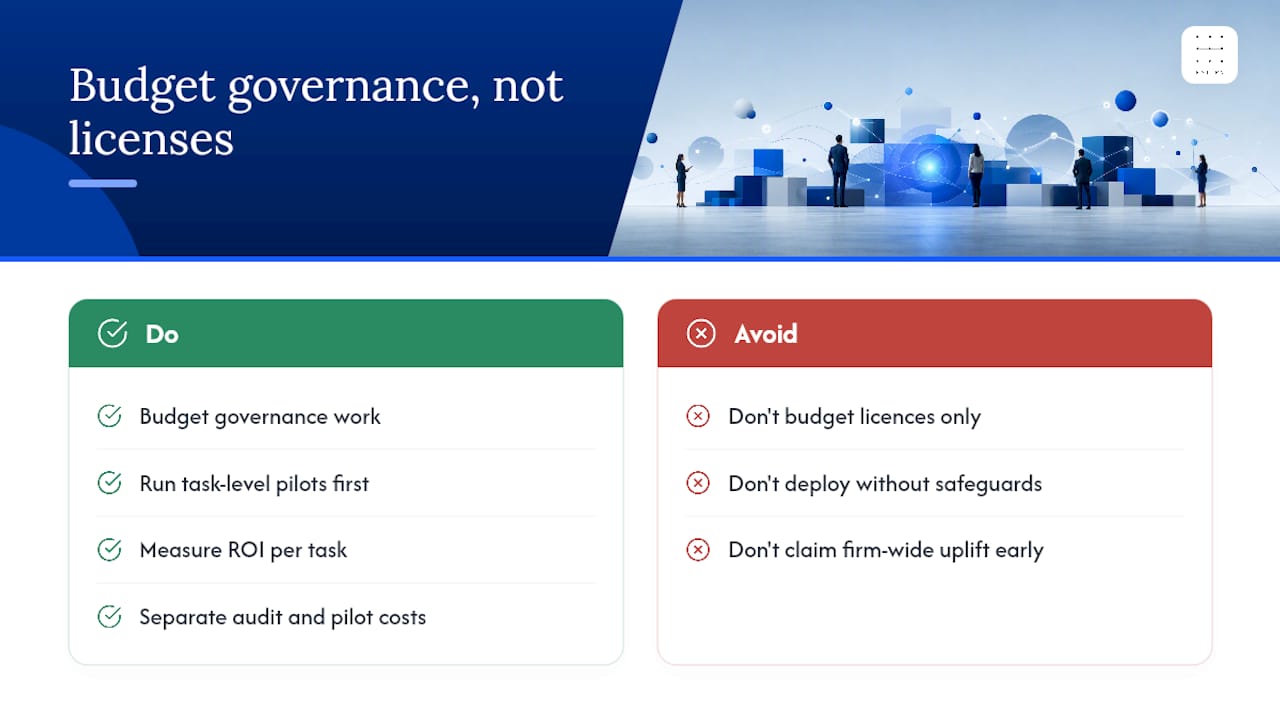
Copilot for Microsoft 365 is licensed per user on top of an existing Microsoft 365 subscription, which means the sticker price is only part of the real cost. The bigger, less visible cost is the governance work described above: the permissions audit, sensitivity label configuration, playbook-to-skill conversion, and the ongoing review cycle. Firms that budget only for licences and skip this groundwork tend to either under-use the tool or, worse, deploy it without the safeguards this article has set out.
Return on investment shows up unevenly. Admin-heavy tasks like meeting notes, correspondence drafting and file summarisation tend to show measurable time savings quickly, often within the first pilot cycle. Complex contract review and litigation discovery take longer to show a return, because the playbook-to-skill conversion process itself takes iteration before accuracy is trustworthy enough to rely on.
Model ROI for one defined task before extrapolating across the firm. As a hypothetical example, measure time spent on disclosure triage before and during a controlled Copilot pilot, including verification and correction time. Budget separately for licensing, assessment and the pilot, then compare the measured result with those costs.
Why governance, not the model, decides whether Copilot works
Most of the commentary on Copilot in legal practice fixates on what the model can generate. That misses the actual decision point. The model’s drafting quality has improved steadily and will keep improving. What has not changed, and will not change, is that a law firm’s exposure comes from what the tool can see and who is accountable for what it produces.
Treat the permissions review as ongoing data governance, not a one-off Copilot task. Existing access problems need attention regardless of which tool exposes them. Keep that review in place when the firm introduces another tool.
The firms getting real value are not the ones with the most ambitious use cases. They are the ones who resisted the pressure to roll out to every fee earner in month one, ran a genuinely small pilot, and treated verification as a workflow design problem rather than a training slide. That discipline is unglamorous, but it is the difference between a tool that earns trust over time and one that gets quietly restricted after its first embarrassing mistake. Our approach through the AI agent development work we do for professional services firms is built entirely around that sequencing: map first, govern second, scale only once both hold.
Rohit
How Pattrn Data helps law firms deploy Copilot safely
Pattrn Data is the practical alternative to hiring a generalist IT consultant for Copilot rollout. Where a generalist sells the licence and leaves you to work out governance alone, we start with the permissions audit and workflow mapping, then build the acceptable use policy, sensitivity label structure, and verification rules around your actual matter types, not a generic template.

For a Copilot permission review, identify the SharePoint, OneDrive and Teams locations in scope, inspect access and record unresolved exposure. For a proposed Copilot Studio workflow, define the test cases and human sign-off points separately. A data inventory or case-study reference does not establish that the firm's controls meet regulatory expectations.
Before committing to a firm-wide rollout, book an AI audit to map your Copilot data scope.
Sources
For product mechanics, read Microsoft's Copilot legal solutions guide and Legal Agent support documentation. The American Bar Association's pre-deployment checklist covers governance preparation. Our data audit tools for AI at work provide further context.
Recommended
Related services
AI Risk & Efficiency Audit
Map real workflows, AI use, data exposure, opportunity value and governance controls before buying or building more tools.
book the AI Risk & Efficiency AuditAI governance consulting
Create policies, approval routes, ownership and controls that teams can actually use day to day.
AI governance consultingSecure AI implementation
Put privacy, supplier review, data boundaries, testing and staff guidance into the implementation plan from the start.
secure AI implementation