
Tenant First Copilot Governance: Security Team Playbook for 90 Days
Short answer
A quick answer first, then the fuller context below.
Tenant first Copilot governance for security teams. Maps Microsoft controls to enforceable steps and includes a 90 day runbook, agent lifecycle gates, and...
Copilot governance is fundamentally a data hygiene problem wearing an AI costume: fix oversharing, apply enforceable defaults, control the agent lifecycle, and measure what Copilot actually touches. If you do nothing else this quarter, remediate oversharing across SharePoint, apply container and sensitivity labels tenant-wide, and turn on foundational Microsoft Purview DLP with audit logging. Everything else in this guide builds on that triage.
TL;DR:
Remediating oversharing, applying sensitivity labels tenant-wide, and enabling foundational Microsoft Purview DLP are critical first steps before scaling Copilot.
Enabling basic controls and locking high-risk SharePoint containers reduce immediate data exposure risks that could surface during Copilot adoption.
Implementing a structured agent lifecycle with admin checkpoints, identity-based governance, and periodic reassessment helps prevent shadow AI proliferation.
First 90-day deployment phases should include a readiness audit, rapid remediation, guardrails testing, and measured scaling, with clear success criteria for each stage.
Measuring audit logs, DLP triggers, and agent activity regularly increases transparency, confidence, and compliance, forming the basis for effective governance and incident response.
Table of Contents
What does effective copilot governance actually require?
Most organisations approach Copilot governance backwards. They write a 40-page acceptable use policy before checking whether three-year-old SharePoint sites are wide open to “everyone” permissions. Copilot doesn’t create new risk so much as it surfaces risk that’s been sitting there for a decade, at scale, on demand, in natural language.
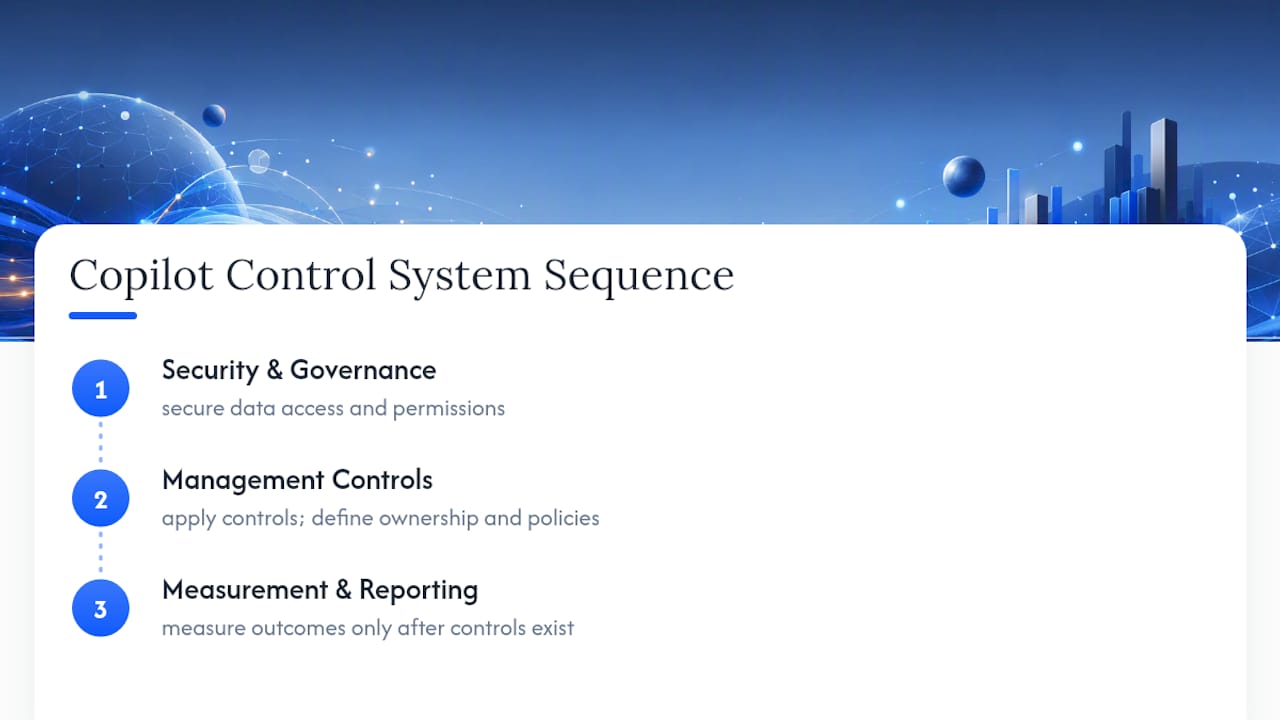
That’s the uncomfortable truth behind Microsoft’s own framing of the problem. The Copilot Control System organises governance into three pillars: Security & Governance, Management Controls, and Measurement & Reporting. It’s a useful structure precisely because it forces sequencing. You cannot measure what you haven’t controlled, and you cannot control what you haven’t secured.
The urgency here isn’t theoretical. IBM’s Institute for Business Value found that 80% of business leaders identify explainability, ethics, bias or trust as a major roadblock to generative AI adoption. That statistic tracks with what we see in professional services firms rolling out Copilot: the technology isn’t the blocker. Confidence that the organisation actually knows what data the AI can see, and who’s accountable when it goes wrong, is the blocker.
Governance for AI decision-making tools like Copilot differs from traditional IT governance in one specific way: the blast radius of a misconfiguration is immediate and conversational. A user doesn’t need to open the wrong file. They just ask a question, and Copilot surfaces whatever it has permission to see.
Foundational versus optimised controls
Microsoft splits Purview capabilities into two tiers, and the distinction matters for budgeting and sequencing. Foundational controls, available on standard licensing, cover basic DLP policies, default sensitivity labelling, and audit logging. Optimised controls, which sit on higher licensing tiers, add deeper AI-specific auditing, adaptive protection, and more granular content classification. Microsoft’s own guidance confirms foundational controls should be treated as non-negotiable before any pilot, with optimised controls planned in as licensing and maturity allow.
Practically, this means:
-
Enable Purview DLP policies scoped to Copilot interactions before pilot users get access, not after.
-
Apply SharePoint Advanced Management reporting identifying sites with broken permission inheritance.
-
Set container defaults so new Teams, sites and groups inherit sensible labels rather than “public” by default.
-
Configure auto-labelling for common sensitive data types (financial records, client identifiers, health data) rather than relying on manual tagging.
-
Build a quarantine workflow for content flagged as mislabelled or overexposed, so remediation doesn’t stall in a ticket queue.
Pro Tip: *Don’t wait for perfect labelling coverage before enabling DLP.
On the infrastructure side, the security development lifecycle principles Microsoft applies to Copilot itself, encryption in transit and at rest, data residency commitments, and Customer Lockbox, all matter, but Customer Lockbox has real limits. It governs Microsoft engineer access requests; it does not stop your own overpermissioned users or misconfigured containers from exposing data through Copilot. Treat it as one control among many, not a safety net.
How do you remediate oversharing before a Copilot rollout?
Oversharing remediation is the single highest-leverage governance action available, and it’s the one most organisations skip because it’s tedious rather than technically hard. Microsoft’s own guidance is unambiguous that identifying high-risk SharePoint sites and files comes before scaling Copilot access, not after.
Detection starts with SharePoint Advanced Management reporting and Graph Data Connect queries to surface sites with anonymous links, broken inheritance, or stale ownership. Most tenants that have never run this audit find a startling number of sites where “everyone in the organisation” has edit access to something that should have been locked to a five-person team years ago.
A practical 30 to 90 day remediation sprint looks like this:
-
Week 1 to 2: Run the oversharing report. Rank sites by sensitivity label and access breadth, not by size.
-
Week 2 to 4: Lock the highest-risk containers immediately. Remove “everyone” and “anyone with the link” access on anything touching client, financial or HR data.
-
Week 4 to 6: Identify unowned or orphaned sites and either assign an owner or archive the content out of Copilot’s reach.
-
Week 6 to 10: Apply interim access restrictions on medium-risk sites while owners complete a formal re-attestation.
-
Week 10 to 12: Automate a recurring lifecycle policy so owner re-attestation happens quarterly, not once.
The re-attestation cadence is where most remediation efforts quietly fail. A one-time cleanup fixes the symptom for a month. Organisations that pair container labelling with mandatory, recurring attestation see meaningfully lower rates of ungoverned data exposure over time, because ownership decay gets caught before it becomes a live risk.
How do you govern Copilot agent lifecycle and licensing?
Copilot Studio makes it trivially easy for a motivated business user to build an agent that connects to a live data source. That’s the point of the product, and it’s also exactly where governance has to work hardest, because self-service creation without lifecycle gates is how shadow AI proliferates inside a tenant that thinks it’s fully governed.
Agent lifecycle management needs distinct stages with admin checkpoints at each one:
-
Creation: Any new agent should inherit a default sensitivity label and a locked-down connector scope, not an open one.
-
Testing: Maker-level testing happens in an isolated environment before any production data connection is approved.
-
Publishing: Publishing to production requires an admin gate, ideally tied to a documented business justification and a named owner.
-
Operation: Ongoing monitoring of connector usage and data access patterns, not a one-time approval and forget.
-
Retirement: A scheduled review that retires or re-attests agents past a defined age, so abandoned agents don’t sit live indefinitely.
Agent 365, paired with Microsoft Entra identities, is what makes this enforceable rather than aspirational. Treating each agent as its own identity, with its own conditional access policy and its own audit trail, means an agent can be governed the same way you’d govern a service account: reviewed, scoped, and revocable.
Self-service doesn’t have to mean ungoverned. The trick is enforceable defaults rather than optional guidance. If a business user can create an agent with unrestricted connector access, some percentage will, regardless of what the policy document says. If the platform default is restrictive and expanding scope requires an approval step, behaviour follows the path of least resistance toward compliance instead of away from it.
Licensing thresholds matter here too. Optimised governance features, deeper agent analytics, advanced conditional access integration, and expanded Purview coverage for agent-generated content, tend to sit behind higher licensing tiers. Budget for that upgrade path early rather than discovering the gap mid-rollout.
How do you measure and audit Copilot activity?
You cannot demonstrate governance to a regulator, a client, or your own board without logs, and Copilot generates a lot of them if you’re capturing the right ones. The baseline capture list should include prompt and response metadata, referenced content sources, agent invocation events, and DLP policy triggers, all routed into Purview audit logs, with high-severity events forwarded to Microsoft Sentinel or an equivalent SIEM for correlation against broader security signals.
Adoption and readiness metrics worth watching on a monthly cadence:
-
Active user counts against licensed seats, to catch underused spend or unexpectedly rapid uptake.
-
DLP policy trigger frequency, which flags where oversharing remediation hasn’t fully landed.
-
Agent creation and publishing rates, as a leading indicator of shadow AI risk.
-
Flagged content access patterns, particularly repeated access to sensitivity-labelled content by accounts outside the expected group.
The 80% figure on explainability and trust as adoption blockers is worth revisiting here: measurement is the direct antidote. A board that can see a dashboard of DLP triggers trending down and agent lifecycle compliance trending up trusts the deployment more than one relying on a policy document nobody has read since it was signed.
Incident escalation needs a defined path before you need it, not after. That means a named contact for suspected data exposure via Copilot, a documented evidence capture process (which logs, which retention window, who pulls them), and a clear line between “this is a false positive” and “this triggers a formal investigation.” Tie this into existing incident response procedures rather than building a parallel Copilot-specific process that nobody remembers exists during an actual incident.
What is a practical Copilot deployment blueprint?
A phased rollout beats a big-bang launch every time, mainly because it lets you catch configuration errors on a small population before they become a tenant-wide incident. The sequence that works in practice runs through four phases.
-
Readiness audit (weeks 1 to 2): Run the oversharing report, baseline current DLP coverage, and inventory existing sensitivity labels. This phase produces the risk register everything else responds to.
-
30-day remediation (weeks 2 to 6): Lock high-risk containers, remove unowned content, apply interim restrictions. This is the sprint detailed earlier, run in parallel with pilot planning.
-
Guardrails deployment (weeks 6 to 10): Enable foundational Purview DLP, set container label defaults, configure agent lifecycle gates in Copilot Studio, and test a handful of agents against the new controls before any wider release.
-
Measured scale (weeks 10 onward): Expand licensing to pilot groups, monitor adoption and DLP metrics weekly, and only extend to the next user cohort once stop/go criteria are met.
Stop/go criteria should be defined before the pilot starts, not negotiated after a problem surfaces. A sensible bar: DLP trigger rate below an agreed threshold, zero unresolved high-severity oversharing findings in the pilot population, and agent publishing gates functioning as tested.
| Phase | Primary action | Owner | Success signal |
|---|---|---|---|
| Readiness audit | Run oversharing and DLP baseline reports | Security lead | Risk register complete |
| 30-day remediation | Lock containers, remove unowned content | IT operations | High-risk sites reduced |
| Guardrails deployment | Enable DLP, label defaults, agent gates | IT and security jointly | Guardrails tested on pilot agents |
| Measured scale | Expand licensing, monitor weekly | Governance lead | Stop/go criteria met each cohort |
The balance to strike throughout is between quick exposure reduction and durable controls. Locking a container is fast and reduces risk immediately. Building the re-attestation cadence that keeps it locked is slower and matters more over eighteen months.
Who owns AI governance and where does human oversight sit?
Governance frameworks and governance models solve different problems, and conflating them is why so many AI policies gather dust. A framework is the policy: what’s permitted, what’s prohibited, what the risk appetite looks like. A model is the operational mechanism that makes the framework real, the roles, the approval gates, the tooling that enforces it. A framework without a model is a document. A model without a framework is arbitrary enforcement with no consistent logic behind it.
A workable Copilot governance model needs distinct roles rather than a single overloaded owner:
-
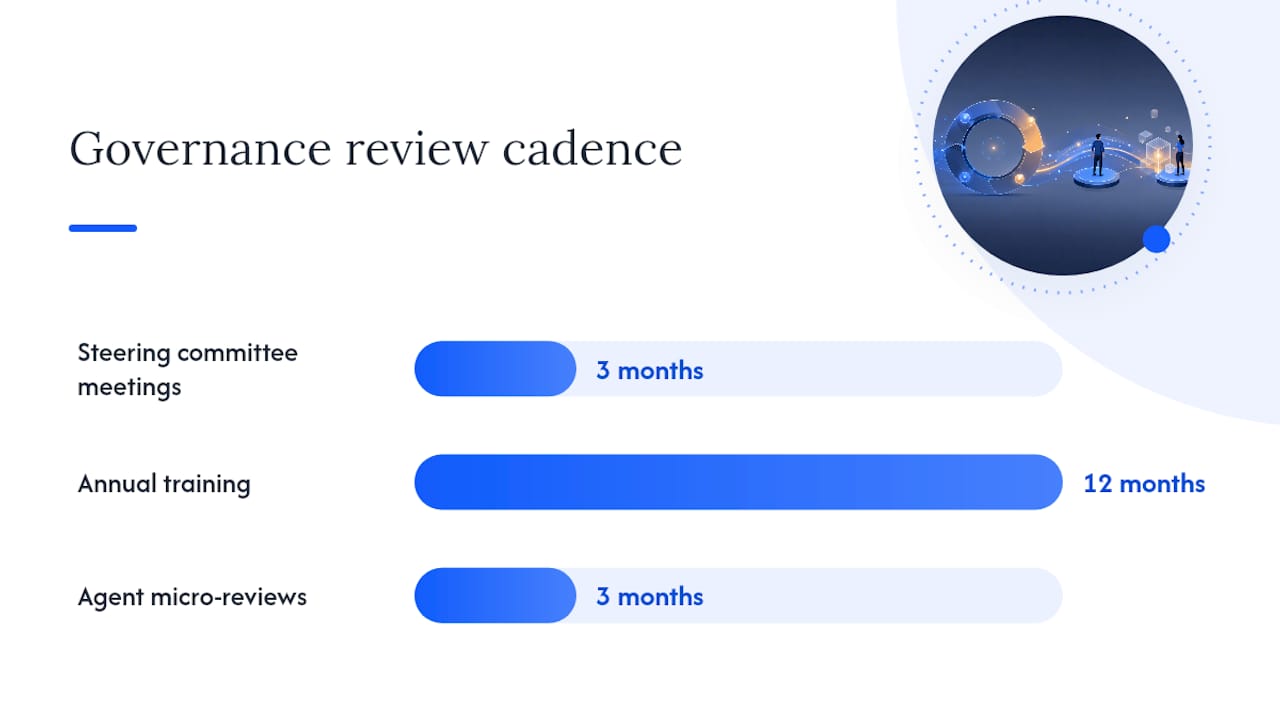
AI steering committee: Sets risk appetite and approves exceptions; meets quarterly, not annually.
-
Data owners: Accountable for the sensitivity and access scope of their specific content areas.
-
Model custodian: Owns agent lifecycle, licensing, and technical configuration across Copilot and Copilot Studio.
-
Security lead: Owns DLP policy, audit logging, and incident response for AI-related events.
Human-in-the-loop requirements should scale with risk rather than apply uniformly. Calibrating human sign-off against a probability times severity matrix means routine internal drafting needs light oversight, while anything touching client-facing regulated advice needs mandatory human review before it leaves the building. Singapore’s IMDA guidance reflects this same principle: governance structures work best when human involvement is risk-based, not blanket.
Training and attestation need a periodic rhythm too. Annual training that nobody remembers by month three is theatre. Quarterly micro-reviews of agent ownership and access scope, tied to the same re-attestation cadence used for SharePoint containers, keep the model live rather than nominal. For firms that need to walk a regulator or a client through exactly how this works, explaining an AI governance approach in concrete terms is a discipline worth practising before you’re asked, not during the audit.
What Copilot Studio and Agent 365 controls affect governance?
Copilot Studio’s security and governance documentation is worth reading in full before any agent goes near production data, because several of its defaults surprise teams that assume Copilot Studio inherits Microsoft 365 settings automatically. It largely doesn’t; governance has to be configured explicitly.
Key admin levers to know before rollout:
-
Publishing controls: Admins can disable the ability to publish generative agents tenant-wide from the Power Platform admin centre, a genuinely useful kill switch when a connector vulnerability or policy gap surfaces mid-rollout.
-
Maker warnings: Copilot Studio surfaces connector dependency insights to makers, flagging when an agent relies on a data source outside the expected governance boundary.
-
Data residency: Telemetry routing and data residency settings need explicit configuration; don’t assume regional data stays regional without checking.
-
Customer Lockbox exclusions: Some Copilot Studio telemetry paths sit outside standard Lockbox coverage, so confirm scope rather than assuming blanket protection.
-
Network egress and ingress: Entra-based network controls let you restrict which agents can reach external endpoints, closing a common exfiltration path.
Representing each agent as its own Entra identity is the single most consequential decision in this section. It means access reviews, conditional access policies, and audit trails apply to agents exactly as they apply to human accounts. An agent that’s just “a feature someone turned on” is unauditable. An agent that’s an identity with an owner, a scope, and a review cycle is governable.
How does the EU AI Act affect Copilot governance decisions?
The EU AI Act uses a risk-tiered structure, unacceptable, high, limited and minimal risk, that mandates escalating obligations as risk climbs. Most Copilot deployments for internal drafting, summarisation or search sit in limited-risk territory, but that changes fast the moment an agent influences decisions about people: hiring, credit, insurance eligibility, or regulated advice.
Practical mapping matters more than reading the regulation cover to cover:
-
Internal knowledge search and drafting assistance: typically limited risk, light-touch documentation.
-
Agents influencing HR, credit, or eligibility decisions: likely high-risk, requiring documented risk assessments and human oversight controls.
-
Client-facing regulated advice generation: treat as high-risk by default until a qualified review says otherwise.
Documentation obligations that follow from high-risk classification include record-keeping of training and configuration decisions, transparency notices telling affected individuals that AI was involved, and audit trails demonstrating human oversight actually occurred rather than existing on paper only.
None of this substitutes for jurisdiction-specific legal advice. The EU AI Act governs EU-market deployments; other jurisdictions have their own emerging frameworks, and firms operating across borders need to map each one rather than assuming one regulation covers all.
What should your first 90 days of Copilot governance look like?
A compact runbook beats a comprehensive one that nobody finishes reading. The top priorities, in rough sequence:
-
Run the oversharing and DLP baseline audit.
-
Lock the highest-risk containers identified.
-
Apply default sensitivity labels to all new containers.
-
Enable foundational Purview DLP policies scoped to Copilot.
-
Turn on audit logging routed to Purview and your SIEM.
-
Remove or reassign unowned content flagged in the audit.
-
Configure agent publishing gates in Copilot Studio.
-
Represent pilot agents as Entra identities with conditional access.
-
Run pilot tests against a defined stop/go criteria set.
-
Set the quarterly re-attestation cadence for owners.
-
Define incident escalation contacts and evidence capture steps.
-
Schedule the first steering committee review at day 90.
Milestones land naturally at 30, 60 and 90 days: remediation complete by day 30, guardrails live and pilot running by day 60, measured scale decision made by day 90. Test queries should specifically probe whether locked containers actually block Copilot access, not just whether the policy shows as “enabled” in the admin centre. Policies that look correctly configured but don’t actually restrict retrieval are a common, quietly dangerous failure mode.
Where the Pattrn Protocol fits in this picture
Pattrndata built the Pattrn Protocol as a workflow-first implementation framework precisely because most Copilot governance failures start upstream of technology, in unclear ownership and undocumented workflows, not in the platform configuration itself. The Protocol maps how work actually happens before setting data boundaries, so the guardrails you apply match real usage rather than a theoretical policy.
The Medical Survey Copilot case study shows this in a regulated, document-heavy setting: an agent built with human review preserved at the decision points that mattered, not automated end to end. That distinction, automating the drafting and retrieval while keeping judgement with the human, is the pattern that holds up under audit. A managed governance retainer takes the 90-day checklist above and operationalises it: someone owns the re-attestation cadence, someone owns the quarterly steering review, and it doesn’t quietly lapse after the initial rollout excitement fades.
The trade-off nobody wants to admit about Copilot governance
Complex policy documents feel responsible. They aren’t, if nobody can point to the enforceable default sitting behind them. The single biggest lesson from watching Copilot rollouts succeed or stall is that minimal, enforceable defaults at launch beat comprehensive policy every time, because a restrictive default gets followed by accident, while a well-written policy gets followed by discipline, and discipline is the scarcer resource.
Centralised governance suits regulated sectors where the cost of a mistake is severe, but it slows the teams closest to the work. A hybrid model, central guardrails on data boundaries and identity, federated execution on which agents get built, tends to outlast the purely centralised version because it doesn’t create a bottleneck that people route around.
The most common pitfall isn’t malicious misuse. It’s abandonment: an agent built for a six-week project that’s still live, unreviewed, three years later, with an owner who left the company. Fix the re-attestation cadence and most of the risk that actually materialises in practice disappears with it.
— Rohit
How Pattrndata helps you operationalise Copilot governance
Pattrndata is the practical alternative to hiring a full-time governance function before you’ve even finished the pilot. Where the checklist in this guide requires sustained ownership, someone running the quarterly re-attestation, someone auditing DLP triggers monthly, we build that structure directly into your tenant through Microsoft Copilot and Copilot Studio workflow design, backed by the Pattrn Protocol’s workflow-first approach.
An AI risk and efficiency audit is the natural starting point: it produces the same risk register the deployment blueprint above calls for, scoped to your actual tenant rather than a generic template. If you’re already mid-rollout and need to demonstrate how audit trails get created for AI-assisted workflows to a client or regulator, that’s a documented part of how we build these systems. Book an AI clarity session to map where your current Copilot deployment stands against the controls covered here, and what a 90-day remediation sprint would look like for your specific tenant.
Sources
Recommended
Choosing AI tools for your practice?
Book a free 30-minute discovery call to talk through the risks and options with Rohit. Use the deeper service links only when you already know the decision needs audit, governance or implementation support.
AI Risk & Efficiency Audit
Map real workflows, AI use, data exposure, opportunity value and governance controls before buying or building more tools.
book the AI Risk & Efficiency AuditAI governance consulting
Create policies, approval routes, ownership and controls that teams can actually use day to day.
AI governance consultingAI workflow automation
Turn repeatable admin, client service and reporting work into controlled workflows with clear human review points.
AI workflow automation support