
Build and Test a Data Retention Schedule for AI Workflows
Short answer
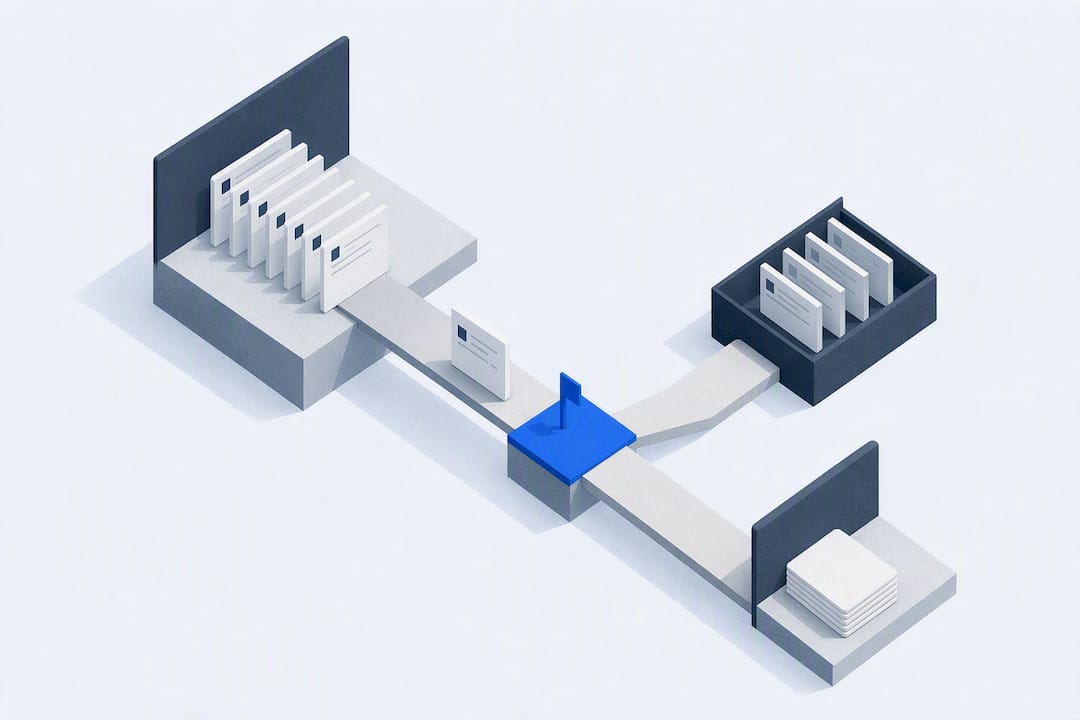
A retention schedule records which records a firm keeps, when the period begins, why the period applies and what happens at its end. Check the legal and contractual basis for each category, then test that your systems and backups follow the schedule.
A retention schedule records which records a firm keeps, when the period begins, why the period applies and what happens at its end. Check the legal and contractual basis for each category, then test that your systems and backups follow the schedule.
TL;DR:
- Retention periods must be justified with specific legal, regulatory, or business reasons, not copied from templates or other firms’ policies.
- Backups may extend data retention beyond the live system if not explicitly addressed, so schedules should account for snapshot overlap.
- Effective retention scheduling requires clear triggers and documented derivations, along with controlled exception management and regular reviews.
- AI-assisted workflows demand retention labeling and approval upfront, with an audit trail showing human oversight before automation acts on data.
- The schedule should be a living document, version-controlled, with mapped system locations, responsible owners, and a pilot test before full implementation.
Table of Contents
- What is a data retention schedule and why does it matter?
- Common retention periods and examples by record type
- How do you set retention periods that hold up under scrutiny?
- Triggers, disposition actions and legal holds
- Operationalising the schedule: tagging, lifecycle rules and automation
- What evidence do auditors actually check?
- Sample retention schedule template and filled examples
- Rollout checklist: the first 90 days
- Retention schedules for AI-assisted workflows
- How Pattrn Data can help you implement a retention schedule
- Sources
What is a data retention schedule and why does it matter?
A data retention policy sets out principles. The schedule turns them into instructions for people and systems: for each category, it records when retention starts, when it ends and why that period was chosen.
Auditors and regulators expect to see the same core fields regardless of sector. The United Nations ICT technical procedure frames a retention schedule as a timetable specifying retention periods, triggers and disposition actions, organised into series with retention codes and a named office of record. That structure holds up whether you run a five-person bookkeeping practice or a national health service.
The columns that repeat across well-built schedules, drawn from templates such as the university records retention schedule, are:
- Category – the record type (invoices, client files, HR records, system logs).
- Description – enough detail that a non-specialist can identify the record.
- Trigger – the event that starts the clock (contract end, transaction date, employment termination).
- Retention period – expressed as a fixed term or as “trigger plus X years.”
- Basis – the legal, regulatory or business justification for that specific period.
- Disposition – delete, anonymise, archive, or transfer to permanent records.
- Office of record – the named team or role accountable for that category.
Version control matters more than most firms assume. A schedule is a living document: retention periods change when legislation changes, when a contract clause introduces a longer term, or when a regulator issues new guidance. Log the version number, the approver, and the review date on the schedule itself, not in a separate change log nobody checks.
Record the source, applicability reasoning, trigger, owner and review date for each period. Have the responsible reviewer confirm the schedule before applying it; this example establishes no universal retention period or audit priority. Related reading: ICO’s storage limitation guidance
Common retention periods and examples by record type
There’s no single number that applies across every organisation, sector or jurisdiction, but certain baselines recur often enough to be a sensible starting point. Aggregated guidance on typical retention baselines points to these commonly cited ranges:
| Record type | Typical baseline | Common driver |
|---|---|---|
| Financial and audit records | a typical multi-year baseline | Tax and audit statutory limits in many jurisdictions |
| Employee/HR files | a typical multi-year baseline post-employment | Employment tribunal limits, pension and tax obligations |
| Health records / PHI | a multi-year sector baseline | Clinical negligence limitation periods, sector regulation |
| Security and access logs | a typical 1–2 year baseline | Operational need, incident investigation windows |
| Backups | Policy-dependent, often shorter than live data | Restore requirements, not a separate retention decision |
Treat every figure in that table as a starting point, not a rule. Local law overrides baselines constantly. A contract clause with a client can extend a retention period well beyond the statutory minimum; a sector regulator can shorten it. The NHS England records retention schedule is explicit that its listed periods are minimums, not defaults, and that exceptions need documenting rather than quietly ignoring.
Backups deserve a separate mention because they’re the category most schedules get wrong. A backup is not a retention decision in itself. If your live system deletes a client file after seven years but your backup rotation keeps 90 days of snapshots, the file effectively survives for up to seven years and three months. Write that interaction into the schedule explicitly rather than leaving it as an assumption.
Pro Tip: If you operate across more than one jurisdiction, add a “jurisdiction override” column to your schedule rather than running separate schedules. One row per category, one column flagging where a local rule beats the baseline, keeps the whole document auditable from a single source.
How do you set retention periods that hold up under scrutiny?
Work through the checks below to choose and document a retention period, rather than copying one from another firm’s template.
- Confirm the applicable periods. Ask the responsible legal or records reviewer to identify the current requirements for each record category and activity, including contract terms and any preservation hold. Record the source and reasoning instead of inferring a period from the firm's sector.
- Assess business need. Some records earn a longer period than the legal floor because you need them for disputes, historical analysis, or ongoing client relationships. Document why.
- Run a risk review. Weigh the cost of holding data (breach exposure, storage cost, subject access request complexity) against the cost of deleting it too early (evidential gaps, lost audit trail).
- Choose the period and record the basis. Write the final number into the schedule with its justification, not just the number alone.
Longer retention is sometimes the right call. Archival research, historic case reference, or a pending dispute can all justify keeping a category past its normal term. When that happens, record it as a documented exception on the schedule rather than a silent override, with a named approver and an expiry or review date for the exception itself.
For a retention or erasure decision involving personal data, ask the privacy reviewer to establish the applicable purpose, period, legal basis and any exception. Record the decision and required action. A schedule documents the planned treatment; it is not, by itself, proof that retaining or deleting a record is lawful.
Triggers, disposition actions and legal holds
A trigger starts the retention period. Describe a specific event that the record owner can identify, rather than an imprecise milestone such as “when the work finishes.”
- Contract triggers: retention starts at contract termination or renewal, not at signature.
- Transaction triggers: retention starts at the date of the transaction or invoice, common for financial records.
- Employment triggers: retention starts at the employee’s leaving date, not their start date.
- Incident triggers: retention for security logs often starts at the log entry date, with a shorter window than most other categories.
Disposition is what happens when the period expires, and it isn’t always deletion. The UN retention schedule uses a small set of disposition codes: destroy, archive, or transfer to permanent records. Secure destruction means the data is unrecoverable, not just moved to a recycle bin; for physical records, that means confirmed shredding or incineration with a certificate.
Have the responsible legal or records team define the preservation instructions applicable to the records, including scope, authority and release. Test that the deletion process checks the resulting hold record before action. Resolve conflicts through that team rather than assuming a universal override rule.
Operationalising the schedule: tagging, lifecycle rules and automation
To put the schedule into practice, map its rows to retention labels, lifecycle rules, system locations and exception logs. The steps below cover that work.
- Tag at ingestion. Apply a retention label the moment a document enters the system, either manually at upload or through automated classification based on file type, location, or metadata. Waiting to tag later means most files never get tagged at all.
- Build lifecycle rules, not one-off deletions. A rule should say retain for X, then archive or delete automatically, with no manual step required to make it happen on schedule.
- Pilot before rolling out. Pick one high-risk, document-heavy category, such as client onboarding files, and run the full lifecycle end to end before touching anything else.
- Maintain an information asset register. If client data lives in your CRM, your email, a shared drive and a backup system, one category can have four different retention clocks running unless you map every system it touches.
- Reconcile backups against the schedule. A backup rotation that outlives your live-system deletion defeats the point of deleting anything.
- Log every exception. Manual overrides, holds, and delayed deletions all need a timestamp and a named approver, or the audit trail has a hole in it.
Tooling like Microsoft Purview Data Lifecycle Management shows the pattern well: retention labels get applied across Exchange, SharePoint, OneDrive and Teams, and lifecycle policies handle the retain-then-delete flow automatically once configured. SharePoint records management and SharePoint document tagging work the same way in practice, applying SharePoint retention labels either by folder, content type, or automated classification rule, so a document is governed from the point it’s saved rather than after someone remembers to sort it.
Map every location before configuring the lifecycle rules. If a document exists in three places but is labelled in only one, the mapping and labelling work is still incomplete.
Pro Tip: Run your pilot on a category with a short retention period, not a long one. A 12 month security log retention rule proves the whole mechanism, tag, lifecycle, deletion, logging, within a year. A seven year financial records pilot won’t tell you if it worked until most people have forgotten why you started.
Where staff use Copilot, custom AI agents, or other tools that touch client documents, retention labelling needs to happen before that data gets consumed by the tool, not after. A related concern worth mapping alongside your schedule is what happens to client data when staff use an AI tool, since an agent pulling from an unlabelled document store can quietly extend a data lifecycle nobody signed off on.
What evidence do auditors actually check?
For a review of retention practice, assemble the schedule, its approval record, sampled application and exceptions. Confirm the evidence the reviewer actually requests rather than assuming one universal audit test.
- The retention policy itself, signed off by a named approver, dated and version controlled.
- The per-category schedule, with documented derivation for every retention period, not just the period itself.
- Named owners for each category (a data owner, with Legal as co-owner on anything touching regulatory limitation periods, and the CISO signed off on security-related categories).
- Destruction logs, recording what was deleted, when, and by what method.
- Legal hold logs, showing who issued each hold, what it covers, and its current status.
- Screenshots or exports of technical controls, proving the lifecycle rule or retention label configuration matches what the schedule says it should be.
Review cadence needs a floor, not just a ceiling. Annual review is the practical minimum for most schedules, with out-of-cycle reviews triggered by new legislation, a contract renegotiation with a longer retention clause, or a regulatory finding. A schedule that hasn’t been reviewed in three years isn’t evidence of stability. It’s evidence nobody’s looking at it.
Sample retention schedule template and filled examples
A working template needs seven columns to function: category, trigger, retention period expressed as trigger-plus-time (T+), justification, disposition, owner, and next review date. Filling in a handful of real categories shows how the columns interact.
| Category | Trigger | Retention (T+) | Justification | Disposition | Owner |
|---|---|---|---|---|---|
| Client engagement file | Contract end | T+ several years | Professional indemnity and limitation period | Archive, then destroy | Legal / Client Owner |
| Invoice / financial record | Invoice date | T+ several years | Tax and audit statutory requirement | Destroy (secure) | Finance |
| Employee HR file | Employment end date | T+ several years | Tribunal limitation, pension obligations | Destroy (secure) | HR |
| Security access log | Log entry date | T+ 90 days | Operational incident investigation window | Destroy (automated) | IT / CISO |
| System backups | Backup creation date | Per rotation policy, not independent | Restore capability, not standalone retention | Overwrite on rotation | IT |
Jurisdictional overrides get added as a note against the row rather than a separate schedule. If a client contract in one region specifies ten years for the engagement file instead of six, flag it directly: “Standard T+6, override to T+10 for contracts governed by [clause reference], confirmed [date].” That keeps one schedule as the single source of truth instead of splitting governance across multiple documents that inevitably drift out of sync.
Bookkeeping-heavy teams handling high invoice volumes often find the trigger point is where things go wrong first: an invoice date logged manually gets typed incorrectly, and the retention clock starts on the wrong day. Tools built around structured invoice capture reduce that specific failure mode by fixing the trigger date at the point of scanning rather than leaving it to manual entry later. Document management platforms with built-in archiving can serve a similar purpose for the office-of-record function, giving one place where the retention clock and the disposition action are visibly linked to the file itself.
Rollout checklist: the first 90 days
- Assign a named owner for the schedule and a legal co-owner for categories with statutory retention periods.
- Inventory your data categories and map which systems each one lives in.
- Choose one pilot category, ideally short-retention and high-risk, and build its trigger and disposition rule fully.
- Implement the lifecycle rule for the pilot category and test it against a small sample before wider rollout.
- Train the named data owner on how the rule works and what to check monthly.
- Create destruction log and legal hold log templates before the first deletion runs.
- Schedule the first formal review, no later than 12 months out.
- Communicate the change to staff and, where required, update client-facing privacy notices to reflect the retention periods now in force.
Retention schedules for AI-assisted workflows
Include automated reading, summarising and movement of client documents in the retention workflow map. Where Copilot or a custom AI agent handles those steps, identify where the schedule’s instructions enter the workflow.
The Pattrn Protocol approach starts by mapping the workflow before touching any tool: where does the document originate, who currently makes the retention decision, and where would an AI agent insert itself into that chain. Retention labels need to be applied, or at minimum verified, before data reaches an agent, not afterwards. That single sequencing decision determines whether your audit trail holds up or has an unexplained gap.
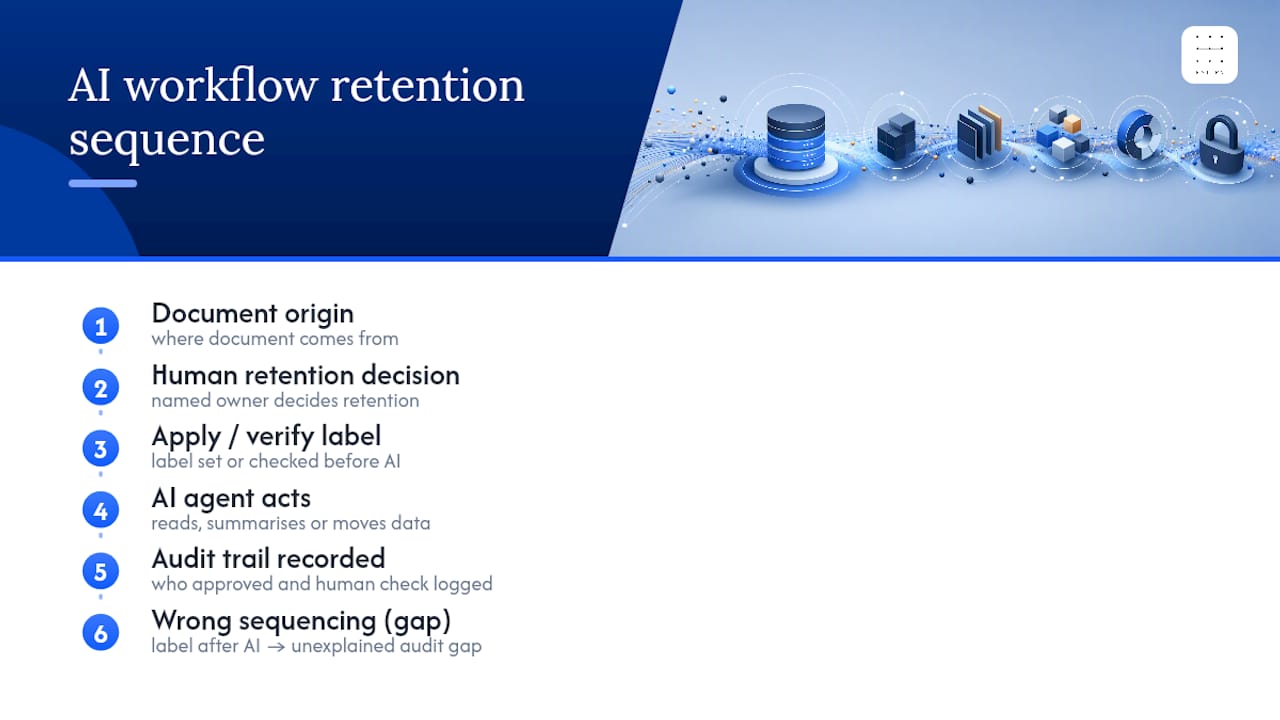
Audit trails matter more, not less, once AI touches client data, because a regulator or a client’s own auditor will ask a very specific question: who approved this record’s retention, and did a human check it before an automated system acted on it? A schedule with named owners and documented derivation answers that. A schedule that exists only as a policy PDF nobody consulted does not.
Start with a controlled pilot: pick one category, apply the label, run the lifecycle rule and test that holds override deletion correctly before expanding further.
Rohit
How Pattrn Data can help you implement a retention schedule
Building the schedule on paper is the easy half. Making it hold under an AI-assisted workflow, where Copilot, agents and automated lifecycle rules touch the same documents your compliance team is accountable for, is where most firms get stuck. Some consultancies help work through that gap: mapping the workflow first, then designing the labels, lifecycle rules and approval checkpoints around the people who still need to make the judgement calls.

A short engagement typically starts with an AI risk and efficiency audit, which maps where your client data actually flows, what’s already tagged, and where the gaps in your audit trail sit before any tooling gets touched. From there, a pilot on a single category, retention labels applied, lifecycle rules configured, hold handling tested, provides evidence suitable for an auditor rather than a policy document that sits unread. If you’re specifically trying to prove your AI-assisted workflows leave a clean audit trail, our guide on creating audit trails for AI-assisted workflows is a useful next read before you book anything. When you’re ready to talk specifics, start with an AI clarity session and we’ll map your workflow together.
This article is general information, not a substitute for advice from a qualified lawyer. Consult a qualified legal professional about your own circumstances before acting on anything here.
Sources
Recommended
Related services
AI governance consulting
Create policies, approval routes, ownership and controls that teams can actually use day to day.
AI governance consultingSecure AI implementation
Put privacy, supplier review, data boundaries, testing and staff guidance into the implementation plan from the start.
secure AI implementationAI Risk & Efficiency Audit
Map real workflows, AI use, data exposure, opportunity value and governance controls before buying or building more tools.
book the AI Risk & Efficiency Audit