
Audit Ready Self Hosted AI For Professional Firms: 7 Fields

Short answer
Before choosing a self-hosted assistant, decide whether it only recommends or can take actions. Map the task, data, permissions, human approval and event record; test incident reconstruction and recovery on a small pilot.
Before choosing a self-hosted assistant, decide whether it only recommends or can take actions. Map the task, data, permissions, human approval and event record; test incident reconstruction and recovery on a small pilot.
TL;DR:
- A controlled pilot should focus on a single workflow with human approval and clear boundaries before scaling AI deployment across a firm.
- An effective audit trail must include trigger details, model version, AI output, actions taken, approvals, timestamps, and downstream outcomes, all linked through correlation IDs.
- Name the assistant's decision owners and agree review, escalation and provenance checks for its actual use. Test those controls; their presence does not establish compliance.
- Regular reviews, versioning, and rollback plans are essential to maintain model performance and adapt to vendor updates or workflow changes over time.
- Staff must be trained on the assistant’s scope and security features, with mechanisms to flag issues easily to foster trust and proper adoption.
Table of Contents
- What makes a self-hosted AI assistant fit for a professional firm?
- How do you design an audit trail that actually holds up?
- How do you deploy a self-hosted AI assistant step by step?
- Who owns AI governance and what must leaders decide first?
- How do you keep a self-hosted AI assistant reliable over time?
- What backup and disaster recovery does a self-hosted system need?
- How do you get staff to actually trust and use it?
- What resourcing does a self-hosted assistant need as you scale?
- Author perspective: how the Pattrn Protocol and Artha apply this guidance
- How Pattrn Data can help you build this properly
- Sources
- FAQ
What makes a self-hosted AI assistant fit for a professional firm?
Distinguish what the assistant may recommend from what it may execute. Even a recommendation-only workflow needs data boundaries and review; an action-capable workflow also needs a defined authority for each write, message or other external effect.
A governed AI assistant needs a trust layer that combines policy, decision rights and human review with technical guardrails and evidence capture, according to EY’s enterprise AI governance research. That layer is not a settings toggle. It is a set of enforced rules about who can approve what, under which conditions, and what happens when those conditions are not met.
Assess the features below against one proposed workflow, with evidence of what is configured and what happens when a condition is not met:
- A trust layer with roles and thresholding. Policies, permission checks and escalation triggers built into the workflow, not bolted on afterwards.
- Audit-grade logging with correlation IDs. Every automated action traceable back to the business event that triggered it.
- In-flight redaction before data reaches the model. Sensitive fields stripped or masked at the point of entry, not cleaned up after the fact.
- Clear separation between recommendation and execution. The assistant can suggest a client email; a human decides whether it sends.
- Integration controls covering SSO, SCIM and OAuth token lifecycle. Every connected app inventoried, every token with an expiry date.
For an action-capable assistant, test whether the record lets a reviewer connect the request, approval, action and outcome. Record gaps explicitly; a populated log does not itself establish that the action was authorised or appropriate.
Data ownership deserves its own line of scrutiny. Ask any vendor directly whether they train on your customer data, and get the answer in writing before any pilot data leaves your systems. Encryption at rest and in transit, plus an external key management (EKM) option where you hold the keys independently of the vendor, should be table stakes rather than a premium add-on.
How do you design an audit trail that actually holds up?
Test the log with a real question: which request led to an action, what permitted it and what changed as a result? A timestamp and success flag alone do not answer those questions.
An audit-ready workflow needs to capture seven fields for every AI Execute action, according to Rework’s guidance on audit trails for AI execute actions: the trigger, the model and prompt template used, the AI’s output including its reasoning, the action taken, the human approval or threshold rule that permitted it, the timestamp and context, and the downstream outcome. Miss one of these and you cannot reconstruct what happened when a client complains or a regulator asks.
| Field | What it captures | Why it matters |
|---|---|---|
| Trigger | The business event that started the workflow | Anchors the log to something real, not a technical timestamp |
| Model & prompt template | Which model version and instructions were used | Lets you reproduce or challenge the output later |
| AI output | The recommendation, including its stated reasoning | Shows what the system actually proposed |
| Action taken | What was executed as a result | Distinguishes a suggestion from a real-world effect |
| Approval or threshold rule | Who approved it, or which rule allowed it to proceed automatically | The core of defensibility |
| Timestamp & context | When and under what conditions | Places the event in a reconstructable sequence |
| Outcome | What happened downstream | Confirms whether the action achieved its intended result |
The audit trail should link request context, AI output, controls, human review and final outcome as one connected chain, not scattered logs across three systems, according to Workhint’s audit trail guide for business teams. A correlation ID, propagated through every system the action touches, is what stitches that chain together.
Where appropriate, keep a protected reference and hash alongside the retained source bytes and review record. Test that an authorised reviewer can retrieve the exact material; a hash without the source is not evidence of what was reviewed. Have the responsible records reviewer set the retention period for each evidence category and jurisdiction.
Pro Tip: Choose a pilot business event and try to reconstruct it from the records. Check that the client matter or transaction, approval and downstream action can be connected without guessing from isolated prompt logs.
How do you deploy a self-hosted AI assistant step by step?
Define the workflow before selecting the assistant. Identify its inputs, permitted recommendations and actions, approval points and stop conditions, then use those requirements to evaluate the deployment.
- Define the workflow boundary and name an owner. Pick one workflow (client onboarding, document review, follow-up chasing) and one person accountable for it.
- Instrument data discovery and classify what’s sensitive. Know which fields are personal, financial or privileged before anything touches a model.
- Apply prompt-level redaction. Strip or mask sensitive fields before they reach the assistant, not after.
- Set approval thresholds and test incident reconstruction. Deliberately try to rebuild a decision from the audit trail alone. If you can’t, the schema is incomplete.
- Govern every OAuth token and integration. Catalogue each connected app, set expiry dates, and plan how you’ll decommission access when a tool or a staff member leaves.
- Measure the pilot and iterate. Track override rate, error types and genuine time saved, then decide whether to widen scope.
Pro Tip: Run an incident reconstruction exercise before go-live. Ask a reviewer to identify who approved the action and the evidence they used, then record any missing links before adding another workflow.
Who owns AI governance and what must leaders decide first?
Name an accountable owner for the assistant and identify who can approve use, change its scope and stop it. A committee can support oversight, but the people handling a live exception still need a clear decision route.
Before using live client material, resolve the following decisions for the particular workflow:
- Accountability. One accountable AI lead, named workflow owners, and a line to board-level oversight for anything touching client money or advice.
- Acceptable use and thresholds. What the assistant may do unattended, what always needs sign-off, and how approvals expire.
- Escalation and retention. Who gets notified when a threshold is breached, and how long records are kept.
- Vendor due diligence. Verified data provenance and a documented check on every supplier in the chain, not just the primary vendor.
This last point matters more than firms expect. Governance requires a whole-of-value-chain approach, inventorying AI systems and verifying data provenance across suppliers and partners, according to OECD due diligence guidance for responsible AI. A tool you trust might still pull in a sub-processor you’ve never vetted.
Include integration access in the operating plan. Record an owner and review or revocation route for each OAuth grant, including what happens when a staff member leaves or the integration is retired.
How do you keep a self-hosted AI assistant reliable over time?
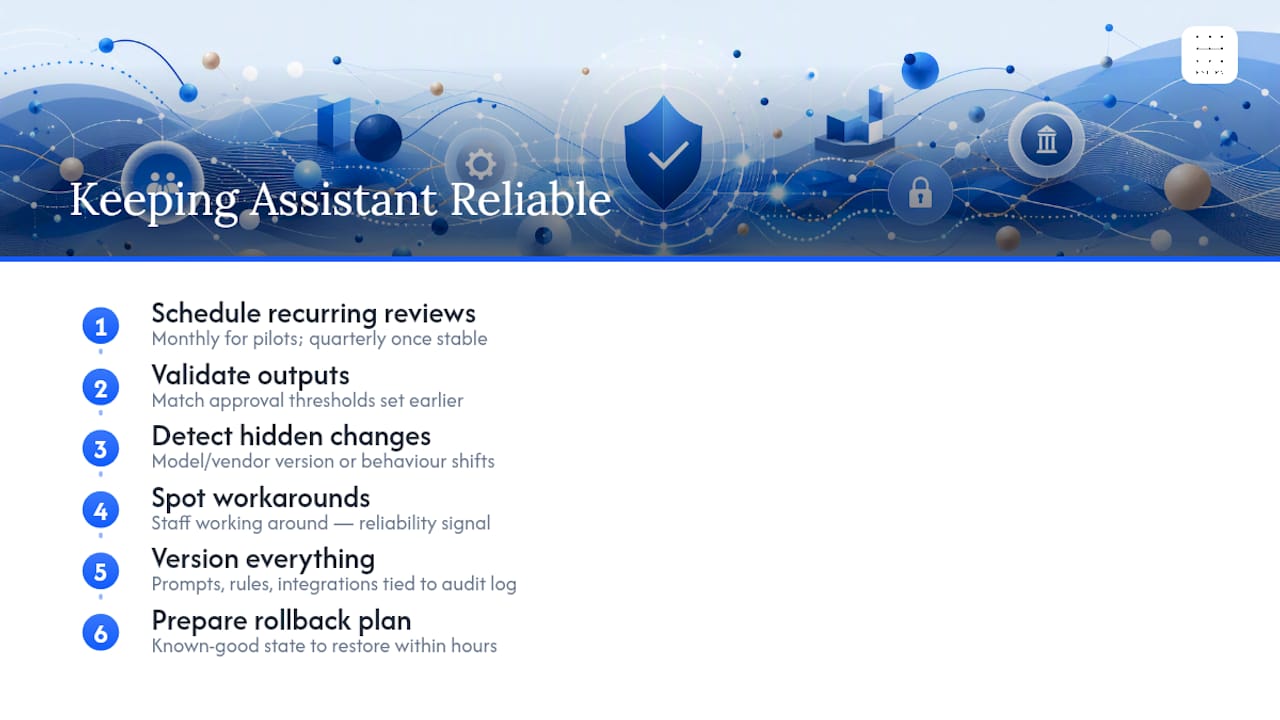
Changes to the model, prompts, connected systems or underlying workflow can affect behaviour. Keep a record of those dependencies so an update can trigger relevant tests rather than passing unnoticed.
Choose review intervals to match the workflow and rate of change. Check outputs against the agreed criteria, confirm the deployed versions and investigate workarounds or overrides. Re-run relevant tests when a dependency or approval rule changes.
Version prompts, approval rules and integration configuration, and link the deployed versions to the event record. For an incident, the reviewer should be able to identify what was in use at that time, not just see the current settings.
Define how to stop the assistant and return to a known-good configuration or manual process. Test that route on the pilot, including how to handle actions already sent to another system; reverting a prompt does not undo an external action.
What backup and disaster recovery does a self-hosted system need?
Identify which work depends on the self-hosted infrastructure and how that work continues during an outage. Include in-flight actions, not just the next request waiting to run.
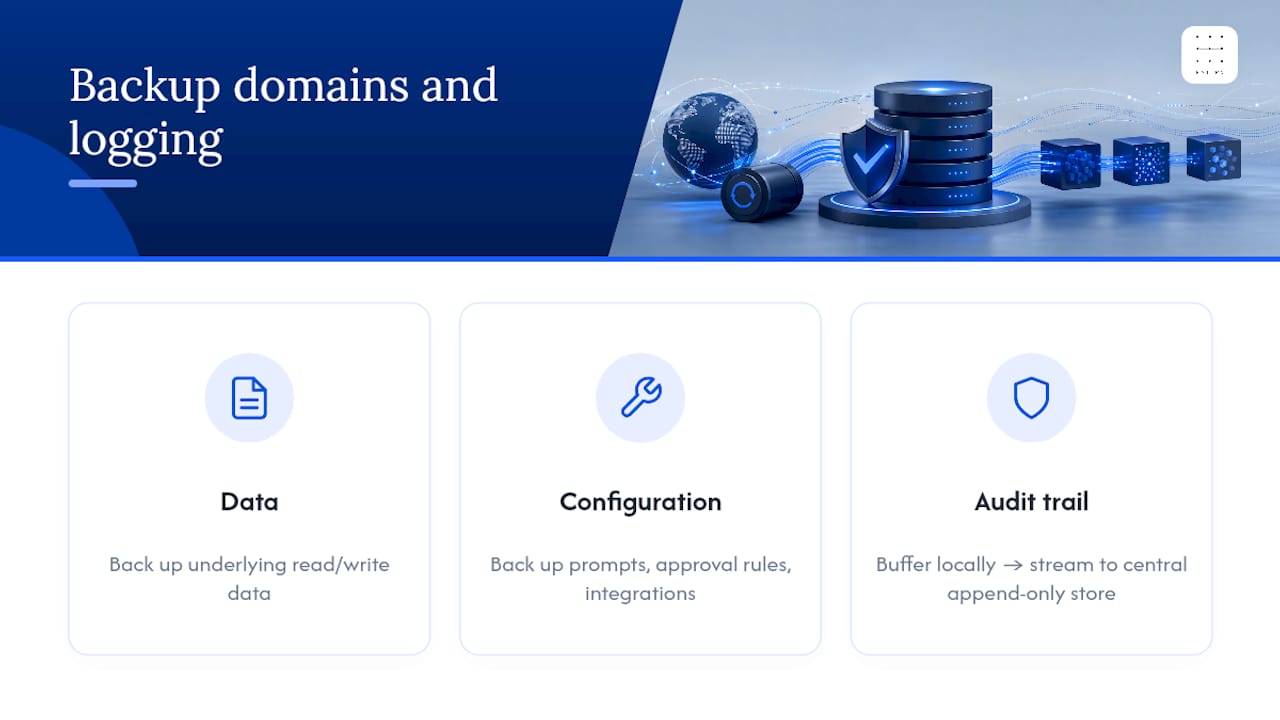
Plan recovery for the data, configuration and event records separately, then test whether they can be reconciled after a restore. If logs are buffered or copied elsewhere, check what happens to incomplete and duplicate events during an outage.
Rehearse an outage during a pilot task. Check that staff can identify whether an action completed, continue through the agreed manual route and preserve the record without repeating an external action.
Firms weighing infrastructure options for this kind of resilience often find lightweight, well-scoped hosting patterns outperform over-engineered enterprise setups for a single-workflow pilot, a point covered well in Zenvor’s guidance on cloud hosting for startups. Right-sizing the infrastructure to the pilot avoids both under-provisioning and paying for capacity you don’t yet need.
How do you get staff to actually trust and use it?
Include staff in the pilot design so they can test the assistant against the work they actually do. Look for unclear boundaries and slow exception routes as well as feature gaps.
Train staff on permitted inputs, recommendation and execution boundaries, and how to stop or escalate a task. Demonstrate those decisions using an example from the actual workflow.
Give reviewers a clear route to reject or correct an output and record why. Inspect overrides during the pilot: separate appropriate challenges from tool errors or impractical controls rather than treating every override as success or failure.
Have the workflow owner review the training examples and exception routes. Include cases that require professional judgement, not only the straightforward path through the tool.
What resourcing does a self-hosted assistant need as you scale?
Before adding another team, reassess infrastructure, integration support and review workload for its actual tasks. Do not assume that the pilot configuration or approval capacity scales unchanged.
Inventory each proposed integration before connecting it: its owner, permissions, data flow, credentials and revocation route. Include the support work required to investigate a failed or partially completed action.
Estimate review demand alongside technical capacity. Test how long approvals take and what happens when the qualified reviewer is unavailable, then decide whether the proposed expansion is supportable.
Author perspective: how the Pattrn Protocol and Artha apply this guidance
Start with what the assistant is permitted to do in a specific workflow. Use the pilot to test the boundary, approval route and record of an action before extending its permissions.
A workable pattern looks like this: a client query comes in, the assistant drafts a recommendation, a named approver reviews it against a threshold rule, and only then does an action fire, with every step written to the audit record automatically. That sequence is what the Pattrn Protocol maps out before any tooling is chosen, and it’s the same logic behind Artha, Pattrndata’s private AI workspace built for exactly this kind of approval-led work.
Rohit
How Pattrn Data can help you build this properly
Before choosing a self-hosted assistant, write down the actions it may take, the conditions for approval and the route for stopping it. Use those decisions to define a pilot that tests behaviour and recovery, not just installation.

An AI clarity session maps your current workflows and shows exactly where an assistant would touch client data, approvals and existing systems, before you commit to anything. From there, an AI Readiness Assessment scopes a controlled pilot with the audit trail, approval thresholds and integration inventory built in from the start, rather than added once something has already gone wrong. For teams already running Artha or considering it, the same governance discipline applies: workflow boundaries first, tooling second. If you’re weighing up how AI tools should connect to your SSO and identity systems, that’s exactly the kind of question a readiness assessment answers before deployment, not after. Book the assessment and get a scoped, working pilot plan rather than a vague roadmap.
Sources
Recommended
Frequently asked questions
What is a self-hosted AI assistant for a professional firm?
It is an AI assistant deployed on infrastructure the firm controls. That hosting choice does not by itself establish data boundaries, approval gates or useful event records; assess and test those separately for the intended workflow.
What’s the difference between a personal AI assistant and this kind of deployment?
A personal assistant and a team deployment may each recommend or act. For the firm, define the users, permitted data, action permissions, reviewers and event records explicitly rather than relying on the product category.
What are the seven fields an audit trail needs?
Trigger, model and prompt template, AI output with reasoning, action taken, human approval or threshold rule, timestamp and context, and downstream outcome, as set out in Rework’s audit trail guidance.
How long should a pilot run before scaling?
Run the pilot until there is evidence for a scope decision: representative tasks, exceptions, incident reconstruction, recovery and enough review capacity for the proposed workload. Elapsed time alone is not a reason to scale.
Can Pattrndata help build one of these systems?
Yes. Clarity sessions, readiness assessments and managed AI workspace solutions are built around the same governance-first sequence described throughout this guide: map the workflow, set the boundaries, then choose the tool.
Related services
AI governance consulting
Create policies, approval routes, ownership and controls that teams can actually use day to day.
AI governance consultingSecure AI implementation
Put privacy, supplier review, data boundaries, testing and staff guidance into the implementation plan from the start.
secure AI implementationAI Risk & Efficiency Audit
Map real workflows, AI use, data exposure, opportunity value and governance controls before buying or building more tools.
book the AI Risk & Efficiency Audit